How to do Keyword Research in 2026: Find Keywords That Convert
You publish a page. It gives me some impressions. Maybe even a few clicks. But nothing happens after that. No calls. No form fills. No sales. That is the moment many site owners realize they did not have a traffic problem. They had a targeting problem.
The real goal is not to chase the biggest number in a keyword tool. It is to match what people want when they search. That is where keyword research that converts starts. It helps you find terms with the right intent, the right page match, and the right chance to turn a visit into action.
By the end of this guide, you will know how to find, sort, and choose keywords with confidence, using a process that fits how search works in 2026. Google still rewards helpful, people-first content, and its newer AI search features still rely on the same strong SEO basics.
What Keyword Research Really Means and Why It Matters
Keyword research is the process of finding the words and phrases your audience uses so you can build pages that match what they want.
A keyword is the term you plan around. A search query is what a real person actually types. Those are not always the same. Search Console itself reports clicks, impressions, CTR, and average position by query, which is why query data is so useful when you want to see what people are really asking for.
This matters because keyword choices affect more than rankings. They shape who clicks, what page they land on, and whether that page can lead them to the next step. A bad keyword is often too broad and too vague. A better one usually ties a real problem to a clear next move.
For example, “shoes” is broad and muddy. “best trail running shoes for flat feet” is far more useful. The second query shows a problem, a context, and a likely page type. That is why keyword research that converts is really about matching intent, not collecting the biggest list.
At the simplest level, most keywords fall into four basic intent buckets: Informational, commercial, transactional, and navigational. Once you can spot those four, your planning gets easier.
The Simple Keyword Research Framework You Will Follow
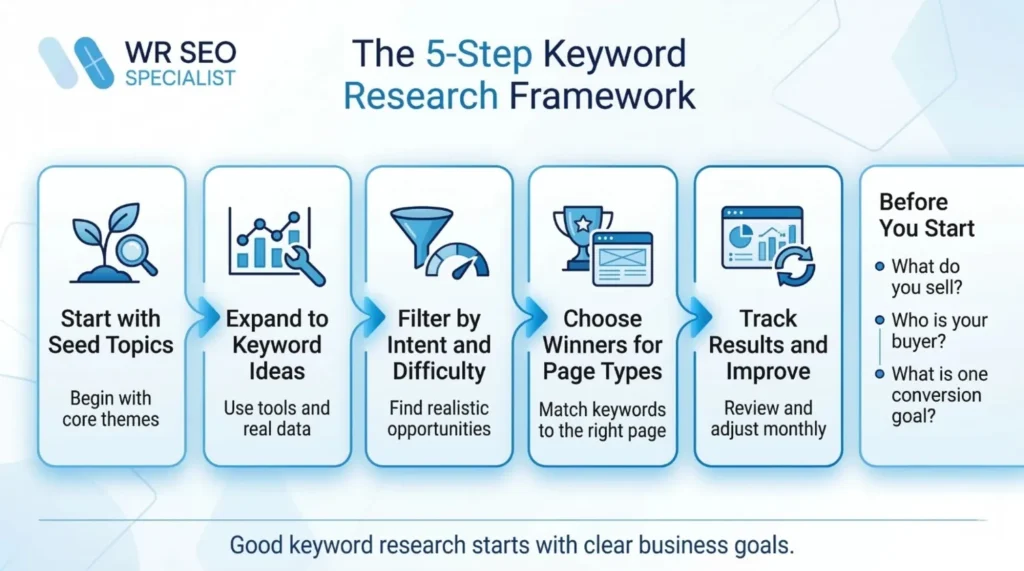
Use this five-part framework every time:
- Start with seed topics
- Expand to keyword ideas
- Filter by intent and difficulty
- Choose winners for the right page type
- Track results and improve
Before you start, answer three questions:
What do you sell? Who is your buyer? What is the one action you want from this page?
That small check keeps your research tied to revenue, not vanity.
How to Do Effective Keyword Research Step by Step
Start with one offer, not your whole business. A focused keyword plan is easier to sort and easier to publish.
Next, list five to ten seed topics based on real customer questions. Then collect ideas from your own data, tools, and competitor research. After that, sort every keyword by intent and page job. Ask one simple question: should this be a blog post, a service page, a product page, or a comparison page?
Then search the keyword yourself. Look at what Google rewards. If the results are mostly guides, build a guide. If they are product pages, build a product page. Google Search works by crawling, indexing, and then serving results it believes fit the query best, so the SERP itself gives you clues about what kind of page belongs there.
Choose keywords based on business value, not ego. A lower-volume phrase with clear intent can beat a big-volume phrase that brings the wrong visitor.
Then build a simple plan. Decide what to publish first, what to refresh, and what to track in Search Console each month. Search Console gives you the key metrics that matter here: clicks, impressions, CTR, and average position.
Use this mini table for your sheet:
| Keyword | Intent | Page type | Priority | Notes |
| example keyword | Commercial | Comparison page | High | Strong fit, weak competition |
Keyword Research Dos and Don’ts That Save You Months
The Dos
- Use real customer language, not only industry jargon.
- Choose keywords with clear intent.
- Group similar keywords into one page when they share the same goal. Ahrefs describes keyword clustering as grouping keywords with the same or similar intent so one page can target them together.
- Use Search Console first to find quick wins. Pages sitting in the middle of page one or page two often need better titles, stronger sections, or better internal links. Search Console is built for that kind of review.
- Check seasonality before you build your calendar. Google Trends lets you compare terms by time and location, and it uses an anonymized, aggregated sample of Google searches.
The Don’ts
- Do not chase volume alone.
- Do not create one page for every tiny keyword variation.
- Do not ignore the SERP layout. AI answers, maps, reviews, and shopping results change what earns the click. Google says its AI features still follow the same core SEO best practices and can surface links in new ways.
- Do not copy competitor keywords without checking fit.
- Do not target terms that are far beyond your current authority if better, more realistic options are available.
The Top 9 Ways to Perform Keyword Research in 2026
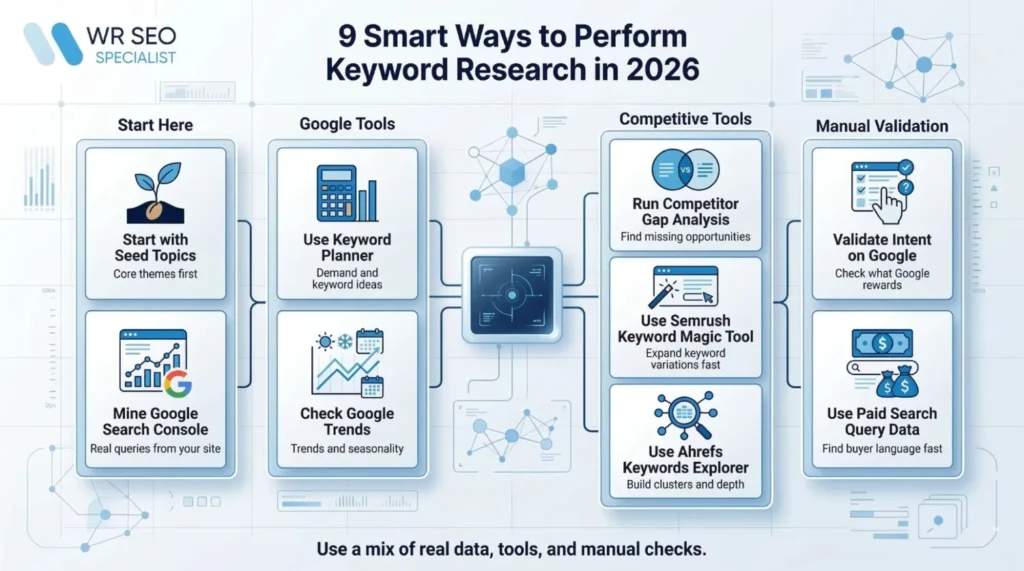
1. Start with seed topics, not random keywords
Seed topics are your main themes. They are not the final keywords. They are the starting buckets.
For a service business, a seed topic might be “kitchen remodelling cost.” For an e-commerce store, it might be “standing desk.”
The steps are simple: Write five customer problems, turn each into a topic, add a beginner version and a buyer version, then save the list for expansion.
This helps you build from real demand instead of random guesses.
2. Mine your Google Search Console data first
This is often the fastest source of real keyword data because it comes from your own site.
Open Performance in Search Console. Compare the last 28 days to the last three months. Look for high-impression keywords with weak CTR, and keywords sitting around positions 8 to 20. Search Console exposes those metrics directly, which makes it perfect for quick-win research.
Then improve the page. Tighten the title. Add missing sections. Strengthen internal links. Refresh the page before you create ten new ones.
3. Use Google Keyword Planner for demand and variations
Keyword Planner is useful when you want fresh ideas and rough demand signals. Google says it can help you discover new keywords related to your business and see estimates of searches and costs.
Start with a seed topic. Use Discover new keywords. Add your website URL for tighter suggestions. Then filter by language and location.
Save the ideas into a list, but treat the numbers as direction, not gospel. Planner is helpful for range and variety. It is not a crystal ball.
4. Check trends and seasonality with Google Trends
Timing matters. A perfect keyword at the wrong time can still flop.
Search your term in Google Trends. Compare two to five versions. Change the location. Look at the last 12 months, then the last five years. Trends lets you explore interest by time, place, and related searches, using anonymized and aggregated search data.
Then note the peaks, dips, and breakout topics. That is how you know when to publish, refresh, or promote.
5. Do competitor gap analysis with SEMrush or Ahrefs
A keyword gap is simple: they rank, you do not.
SEMrush defines keyword gap analysis as comparing your website’s rankings with competitors to find relevant keywords they rank for and you do not. Its Keyword Gap tool can compare up to five domains side by side.
List three to five real competitors. Run the gap report. Filter for relevance and intent. Then sort the results by page type. A guide keyword should not be mixed into a service-page bucket.
6. Use SEMrush Keyword Magic Tool for fast expansion
This is one of the fastest ways to grow a small seed list into a larger working list.
SEMrush says Keyword Magic Tool shows related terms from one seed keyword and lets you filter by metrics such as search volume, keyword difficulty, search intent, and CPC. It also breaks terms into topic-based subgroups.
Enter a seed term. Filter by difficulty, intent, and volume. Use modifier groups like best, price, near me, and how to. Then save the groups and turn them into page ideas.
7. Use Ahrefs Keywords Explorer for depth and clustering
Ahrefs is helpful when you want to go deeper into related questions and clusters.
Ahrefs says Keywords Explorer shows keyword difficulty, search volume, traffic potential, and related term groupings. It also explains clustering as grouping keywords with the same or similar intent so one page can target them together.
Search the seed keyword. Open matching terms and questions. Check the parent topic. Build clusters so you do not create five pages that all fight each other.
8. Validate search intent manually on Google
Tools are useful, but they can still label intent badly.
Search the keyword in an incognito window. Study the top results. Are they guides, product pages, comparison pages, or local listings? Look for featured snippets, map packs, review stars, and shopping blocks.
This step matters because the results page tells you what Google already believes the query needs. Your page should fit that job.
9. Use paid search query data if you run Google Ads
Paid search data is one of the best ways to hear buyer language.
Google Ads says the search terms report shows the searches that triggered impressions and clicks for your ads, and it can help you refine your keywords.
Open the search terms report. Find high-converting queries. Note expensive terms with strong intent. Group them by intent, then turn them into SEO pages that can earn traffic without paying for every click.
How to Choose the Right Keywords After You Collect Them
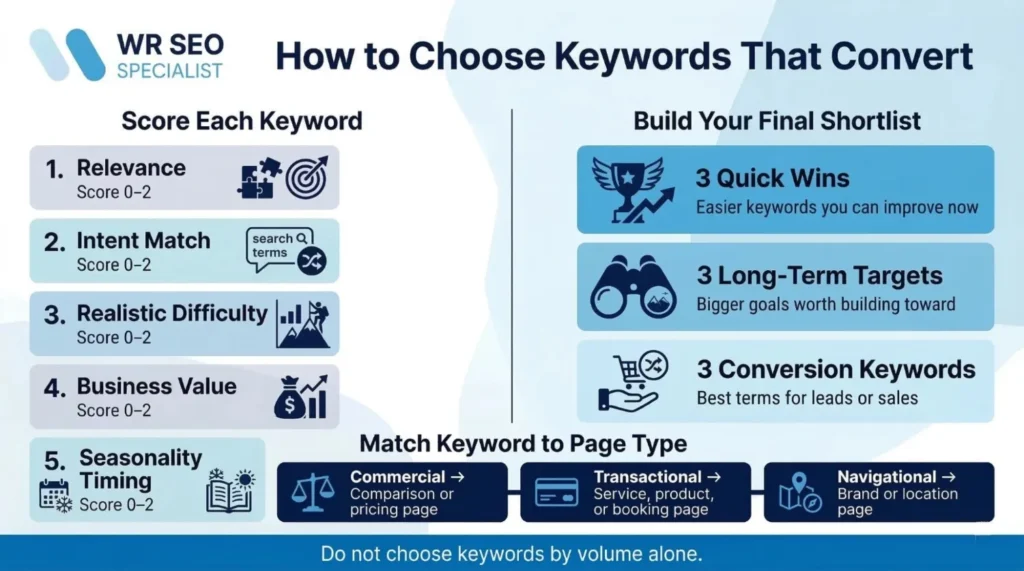
Once the list is big enough, score each keyword in five areas:
- Relevance
- Intent match
- Realistic difficulty
- Business value
- Seasonality timing
Give each one a score from 0 to 2.
Then pick three quick wins, three long-term targets, and three conversion keywords.
This keeps the plan balanced. You need some terms you can move on soon, and some that build long-term strength.
Turn Keywords Into a Simple Content Plan That Ranks
Map the keyword to the page type.
Informational keywords belong on guides and blog posts.
Commercial keywords belong on comparisons and pricing pages.
Transactional keywords belong on service, product, booking, or quote pages.
Navigational keywords belong on brand, location, and contact pages.
Then connect them.
A strong internal linking path looks like this:
guide to comparison to service page.
That path helps the reader move from learning to deciding to acting. It also helps search engines understand how your pages relate to each other. Google’s people-first content guidance is clear that SEO works best when it supports content that helps users reach their goal.
A simple 30-day plan works well for most sites:
week one, fix quick wins; week two, publish one commercial page; week three, publish one guide; week four, tighten internal links and review Search Console.
Shortly
You do not need hundreds of keywords to start. You need a short list of strong ones that match your offer, your audience, and the page you plan to publish.
Start with 20 to 30 solid targets. Use the nine methods above. Build your first clusters. Then publish with purpose.
If you want the process cleaned up, prioritized, and mapped to pages that can bring calls, leads, and sales, WR SEO Specialist is a smart place to start. The right keyword plan does not just help you rank. It helps you publish pages with a job to do.
FAQs
How many keywords should one page target?
Usually one main keyword cluster is enough. That means one primary target and several close variations that share the same intent.
What is a good keyword difficulty for a new site?
There is no magic number, but lower-difficulty terms are often safer early on. Ahrefs explains keyword difficulty as an estimate of how hard it may be to rank on the first page, based largely on the links pointing to top-ranking pages.
How often should you redo keyword research?
Review it lightly every month and more deeply every quarter. Search Console trend changes and new query data can reveal fresh opportunities.
Should you target near me keywords?
Yes, if local intent matters to your business. Just make sure the page supports that local need with location signals, clear service areas, and a real next step.
What is the fastest way to find keywords that convert?
Start with Search Console and paid search terms if you have them. Both come from real user behavior, not guesswork.