Types of Search Queries Explained: Informational vs Transactional vs Commercial vs Navigational
You check your rankings and feel that cold drop in your stomach. Traffic slides. Leads slow down. Nothing “big” changed on your site, yet your growth stalls. Some owners even worry about penalties, even when they have played it straight.
Here is the new reality in 2026. AI summaries and zero-click results can satisfy a search before anyone visits your page. In a Pew Research study, people clicked traditional results far less when an AI summary appeared.
That is why this feels unfair. It is not always that you lost rankings. Often, the result layout changed, and the click went missing.
The core idea is simple: the type of query decides what Google shows, and whether you earn the visit. Once you understand search queries at a glance, you stop guessing and start matching the right page to the right moment.
Search Queries 101: What They Are and Why They Are Not Keywords
A search query is what a real person types (or says) into Google.
A keyword is what we choose to target on a page.
That difference matters because people do not search like marketers. They search like humans:
- They misspell things.
- They use short phrases.
- They talk to voice search.
- They stack questions in one line.
Also, one query can mean different things, depending on the person.
“Best accountant” could mean:
- “Teach me how to choose one.”
- “Show me top firms near me.”
- “I want pricing and an appointment today.”
So if you treat every query like the same “keyword,” you will build the wrong page, and your results will feel random.
How Search Engines Decide What to Show: The 2026 Version
Google’s job is not to “reward” a website. It is to satisfy the search.
From a site owner’s view, the process is still three big steps: crawling, indexing, and then show what seems most helpful.
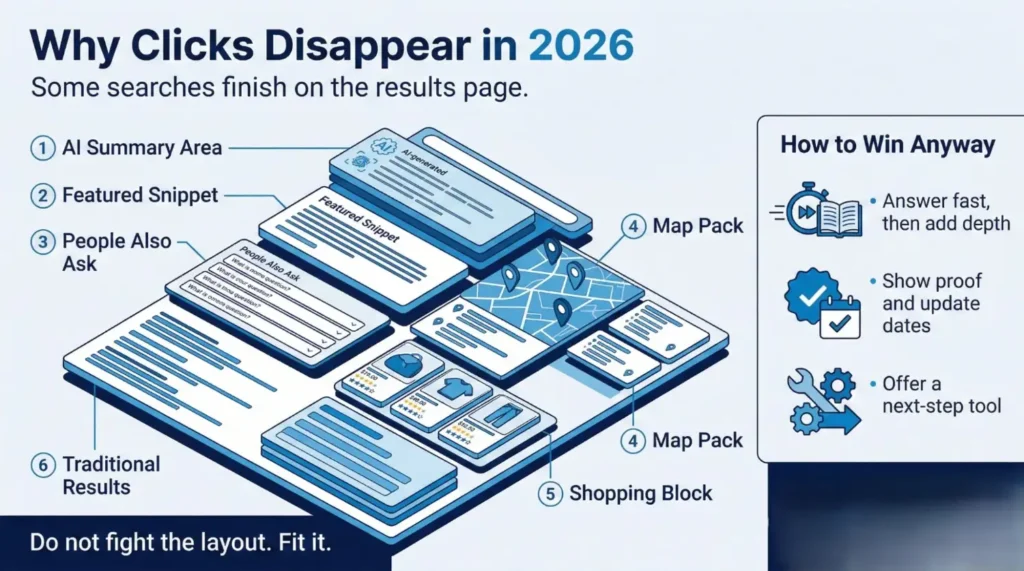
In 2026, the twist is how Google can satisfy a search right on the results page:
- AI Overviews or other AI features can answer quickly.
- Map results can handle local needs without a website click.
- Shopping blocks can short-circuit the journey for buyers.
So you are not only competing for “rankings.” You are competing for the result layout that appears for that query.
This is why two sites can both “rank,” yet one gets the click, and the other gets ignored.
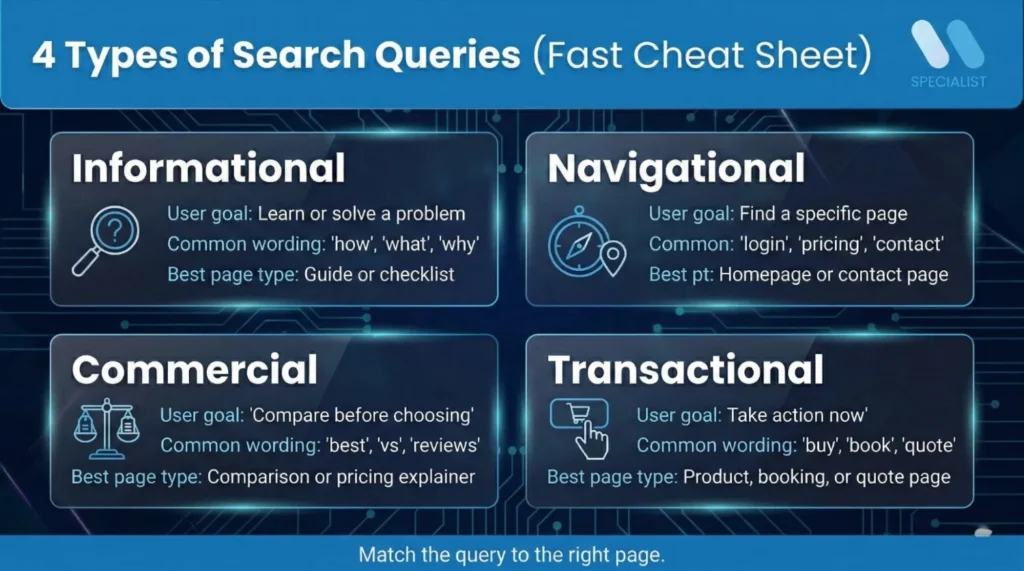
The Four Core Types of Search Queries: Quick Overview Table
Use this table as your cheat sheet. It also helps you pick the right page type fast.A quick rule that works well:
| Query type | User goal | Common wording | What Google often shows | Best page type |
| Informational | Learn or solve a problem | how, what, why, guide, tips | AI summary, featured snippets, PAA | Guide, checklist, explainer |
| Navigational | Reach a specific brand/page | brand + login, pricing, contact | sitelinks, brand panels, maps | Homepage, contact, location |
| Commercial | Compare options | best, top, vs, reviews, alternatives | lists, reviews, comparison features | Comparison page, “best for” |
| Transactional | Take action now | buy, order, book, quote, cost | shopping blocks, map pack, calls | Product, booking, quote page |
If you can guess the next user action, you can classify intent.
“Learn” points to informational.
“Find you” points to navigational.
“Compare” points to commercial.
“Act now” points to transactional.
Informational Queries: Learning and Problem-Solving
Informational queries mean: “Help me understand.”
These searches usually look like:
- How to
- What is
- Why does
- Guide
- Tips
- Examples
- Symptoms
In 2026, these results often trigger AI summaries and question boxes, because Google is trying to answer quickly.
To win informational queries, do two things.
First, answer the question early.
Put the direct answer in the first few lines, then explain.
Second, make the page easy to scan.
Short sections. Clear headings. Simple examples.
A smart move most sites skip is the “next step” bridge. If someone is learning, they often want the next move right after:
- “Here is what it means.”
- “Here is how to choose between options.”
- “Here is what it costs.”
- “Here is what to do next.”
That bridge helps you capture commercial intent without feeling salesy.
Navigational Queries: Find This Brand, Page, or Login
Navigational queries mean: “Take me there.”
People already know the brand or the destination. They just need the fastest path.
Common patterns:
- Brand name + login
- Brand name + pricing
- Brand name + contact
- Brand name + address
- Brand name + reviews
These queries often show sitelinks, brand panels, and maps.
Here is the win: navigational traffic is usually high trust.
The person is not browsing. They are trying to reach you.
So make the destination easy:
- Keep page titles clear and consistent.
- Make contact and location pages obvious.
- Use simple navigation labels that match what people search.
If your “Contact” page is buried or confusing, you lose a ready-to-call lead for no good reason.
Commercial Queries: Comparing Before Choosing
Commercial queries mean: “I want options, not a lecture.”
This is the shopper mindset, even for services.
Common patterns:
- Best
- Top
- vs
- Alternatives
- Reviews
- Pricing comparison
In 2026, these results often surface list-style pages, review snippets, and comparison formats.
The best commercial pages do not just list options. They reduce fear.
Here is the trust section most pages miss:
- Proof: real results, real constraints, real context
- Limitations: who it is not for
- Decision help: “If you care most about X, choose Y”
That third point is gold. It turns a reader into a decision-maker.
Commercial pages also set you up for the next step: transactional action. If you do this right, your “compare” page becomes your strongest lead generator.
Transactional Queries: Ready to Act Now
Transactional queries mean: “I am ready.”
For e-commerce, you see:
- Buy
- Order
- Discount
- Shipping
- Near me
For service businesses, it is often:
- Book
- Call
- Quote
- Appointment
- Availability
- Cost
These queries can trigger shopping blocks, map packs, call buttons, and booking features.
Your transactional page has one job: remove friction.
The basics that matter most:
- The offer is clear in one glance.
- The page loads fast.
- The next step is obvious.
- The form is short.
- The reassurance is real (what happens after you submit, how fast you reply, what you need from them).
A common leak: people send transactional searches to blog posts. The visitor wanted a quote. You gave them a lesson. They leave.
The Most Confusing Part: Commercial vs Transactional and How to Tell Fast
These two get mixed up all the time, so here are two quick tests.
The wallet test:
Are they still choosing, or are they ready to spend?
- “Best CRM for small business” is commercial.
- “CRM pricing” is usually transactional.
- “Book CRM demo” is transactional.
The page test:
Would a comparison page satisfy them, or do they need a booking or checkout step?
If they need to act, send them to an action page.
Examples make this obvious:
Products
- “Best noise-cancelling headphones” = commercial
- “Sony WH-1000XM price” = transactional
Services
- “Best immigration lawyer in Toronto” = commercial
- “Immigration lawyer consultation fee” = transactional
- “Book immigration lawyer consultation” = transactional
The common mistake is treating all “high intent” keywords as transactional. Many are commercial first.
The Missing Layer in Most Guides: On-SERP Fulfilment and Zero-Click Intent
Here is the big 2026 layer that most intent guides gloss over.
Some searches get “finished” on Google.
That does not mean you lost. It means your job changed.
A major zero-click study (using clickstream data) found that only a minority of searches result in clicks to the open web.
So what should you look for?
- AI summaries or AI features at the top.
- Maps with “call” and “directions” buttons
- Quick facts panels
- Calculators
- Expanded snippets and question boxes
What do you do about it?
Keep it practical:
- Structure answers for easy extraction
Give short, clear answers near the top of sections. - Build credibility signals
Show who wrote it, when it was updated, and why it is trustworthy. - Create a click-worthy next step
If Google gives a quick answer, your page needs the deeper payoff: templates, checklists, examples, pricing guidance, and decision tools.
This is the new win condition. Not just “rank,” but “earn the next step.”
The 2026 SERP Fingerprint Method: A Practical Way to Classify Any Query
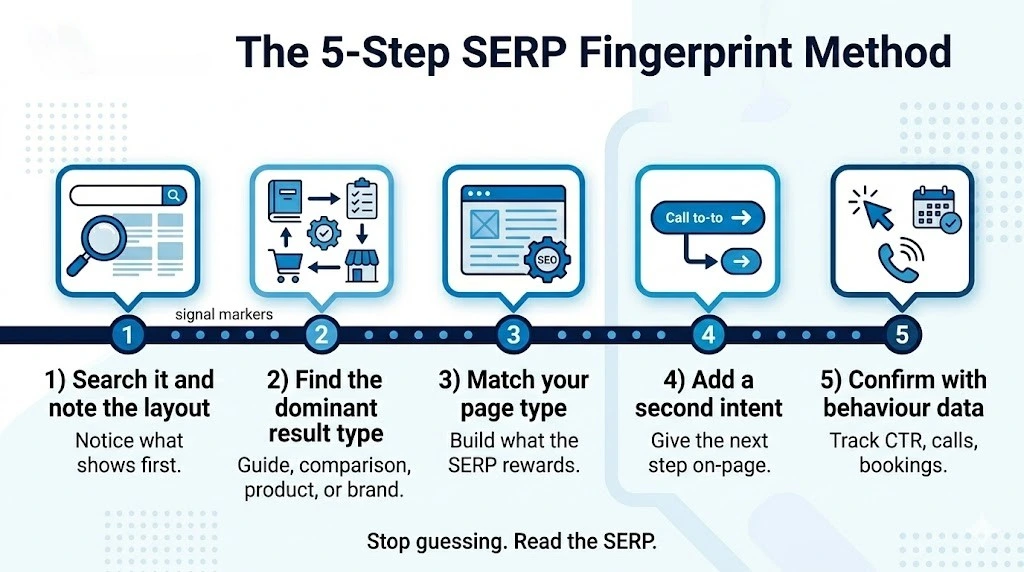
If you want a method that works even when the wording is messy, use this.
Step 1: Search the query and note what shows first
AI summary, map pack, shopping block, reviews, sitelinks.
Step 2: Identify the dominant result type
Is Google rewarding guides, product pages, comparison pages, or brand pages?
Step 3: Match your page type to that layout
Do not fight the SERP. Fit it.
Step 4: Add a second intent on the page
This is intent stacking. It helps you keep the visitor.
Step 5: Confirm with behaviour data
Look at CTR, scroll depth, calls, bookings, and assisted conversions.
This method is simple, but powerful, because it respects how Google is choosing to satisfy that query today.
Intent Stacking: One Page Can Serve More Than One Query Type
Intent stacking means you serve the main intent first, then offer the next move.
Why it works: people often want two things in one visit.
They want clarity, then they want action.
Two common stacks:
Informational to commercial
They learn, then they compare.
Example flow:
- Quick definition
- “What to watch for”
- Comparison table
- “Best option for X” section
Commercial to transactional
They compare, then they book or buy.
Example flow:
- Comparison points
- Proof and constraints
- Pricing range
- Clear call-to-action
The easiest structure is: Answer first, proof second, next step third.
When you build pages this way, you stop losing visitors at the moment they are ready to move forward.
How People Move Between Query Types Over Days or Weeks
People rarely buy in one search.
A common journey looks like this:
learn, compare, act, then return later to find you again.
That last part matters. After someone becomes interested, they often switch to navigational searches like “brand name reviews” or “brand name pricing.”
You can support intent drift with:
- Internal links that point to the next step
- Retargeting pages that match the next likely question
- FAQs that answer “before I book” doubts
- Clear navigation that makes it easy to return
What to avoid: isolated pages that do not guide the next action. Those pages get traffic, but they leak leads.
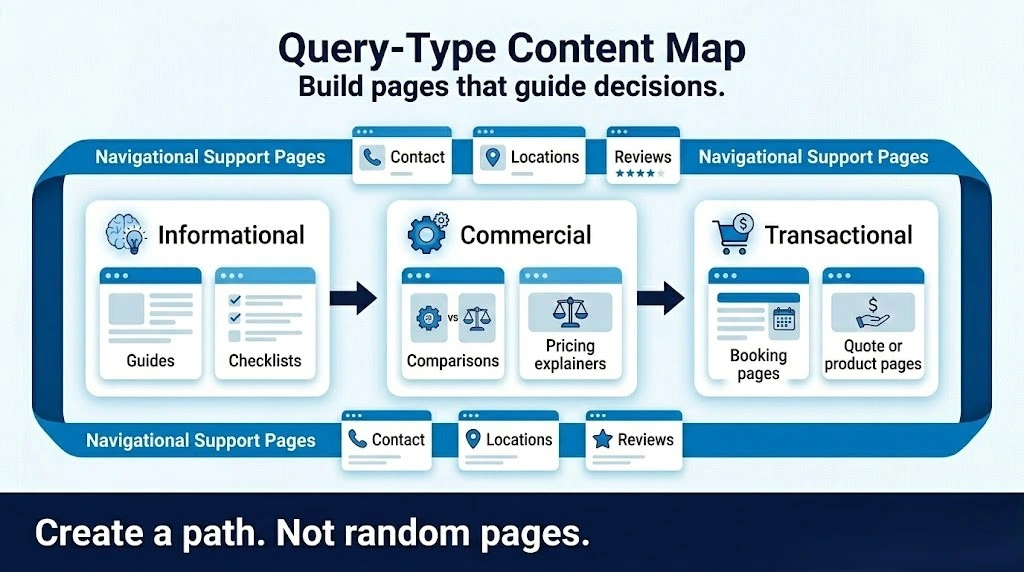
How to Build a Query-Type Content Map for Your Website
This is where most business sites level up fast.
Start with the pages that make you money, then build outward.
- Start with your transactional pages
Service pages, booking pages, quote pages, product pages. - Add commercial pages that feed into them
Comparisons, “best for” pages, pricing explainers. - Add informational pages that feed into comparisons
Guides, checklists, “how to choose” pages. - Strengthen navigational pages
Homepage, contact, locations, about, reviews.
Here is the benefit: when you map your site around intent, your internal links become obvious. You are no longer tossing random blog posts into the void. You are building pathways based on how people actually use search queries.
A simple structure that works:
- One hub page per main topic
- Supporting pages for each query type
- Internal links that push the next step naturally
What to Measure in 2026: When Traffic Alone Lies
Traffic still matters, but it does not tell the whole story anymore.
In 2026, measure four buckets:
Visibility metrics
- Impressions
- Average position
- Map views
- Product views
Engagement and action metrics
- Calls
- Form starts and completions
- Bookings
- Add-to-cart or checkout starts
SERP presence checks
- Do you appear in snippets or AI features
- Do you show in local pack results
- Are your pages the dominant type Google is rewarding
One-page reporting template
- One section per intent type
- Top queries
- Best page
- Next fix
Why this matters: if AI summaries reduce clicks, you may see “flat traffic” even while brand exposure rises. Pew’s findings on reduced clicking with AI summaries are a strong reminder to track beyond sessions.
Common Mistakes Business Owners Make and Quick Fixes
Here are the mistakes that cause the most wasted time.
- Mistake: guessing intent from one word
Quick fix: use the SERP fingerprint method and match the dominant result type. - Mistake: writing one mega page for every intent
Quick fix: build separate pages for separate jobs, then link them. - Mistake: sending transactional searches to blog posts
Quick fix: route action queries to booking, quote, or product pages with clear CTAs. - Mistake: ignoring navigational queries
Quick fix: tidy up contact, locations, pricing, and review pages.
These fixes are not complicated. They are just overlooked.
In a Nutshell
If your rankings feel “unfair” in 2026, you are not imagining it. Search is changing, and clicks are harder to earn when the results page can satisfy the search on its own.
The good news is this: once you map query types to the right pages, your site starts working like a guided path, not a pile of articles.
If you want help building that path, WR SEO Specialist can audit your current pages, spot the intent gaps, and turn your content into a clear system that earns clicks, calls, and bookings, even when the SERP keeps shifting.
FAQs
1) How do I tell which query type brings the best leads?
Look at the queries that end in calls, bookings, or form submissions. Transactional queries usually convert best, but commercial queries often assist the sale by helping people choose.
2) Why do I rank but still get low clicks in 2026?
Because the result layout may answer the question before the click. AI features, maps, and quick answers can pull attention away from standard links.
3) What pages should I build first if I have a small site?
Start with one strong transactional page per core service, then add one commercial comparison page, then one informational guide that feeds into it.
4) Can one keyword belong to more than one query type?
Yes. Many queries have mixed intent. That is why the SERP fingerprint method works better than guessing based on wording alone.
5) What is the fastest way to classify intent without tools?
Search the query and look at what Google shows first. If it is guides, it is likely informational. If it is comparisons, it is commercial. If it is product or booking pages, it is transactional. If it is brand panels and sitelinks, it is navigational.