

What Are Orphan Pages in SEO? How to Find and Fix Them (2026 Guide)
Imagine your website as a library. Each page is like a book, carefully written, designed and published. But if some of those books never make it onto the shelves, no one will read them. In the online world, orphan pages are those hidden books. They exist on the website, but no other page links to them. They may be in your sitemap or even indexed by search engines, yet visitors and crawlers have no clear path to reach them.
Hidden pages can be blogs, service pages, landing pages, case studies or product pages. Without links from other pages, they remain isolated. Search engines may discover them slowly, so they struggle to understand and rank them. People may only find them if they know the exact address. These pages become silent assets — valuable content that brings no traffic and no business value.
This guide explains:
- What orphan pages are. They may be called unlinked pages, isolated pages, standalone pages or hidden URLs.
- Why orphan pages hurt search engine optimization (SEO). They waste crawl budget and prevent your link equity from flowing to important pages.
- How orphan pages appear. Redesigns, site migrations and forgotten campaigns often leave URLs floating alone.
- How to find them. Use crawls, sitemaps, analytics and server logs to discover pages missing from your internal link structure.
- How to fix them. Learn when to rescue, merge, redirect, remove or deliberately hide pages.
- How to prevent new orphan pages. Plan internal links before publishing and run regular audits.
By the end of this guide you will know how to turn hidden pages into assets that search engines and users can easily find.
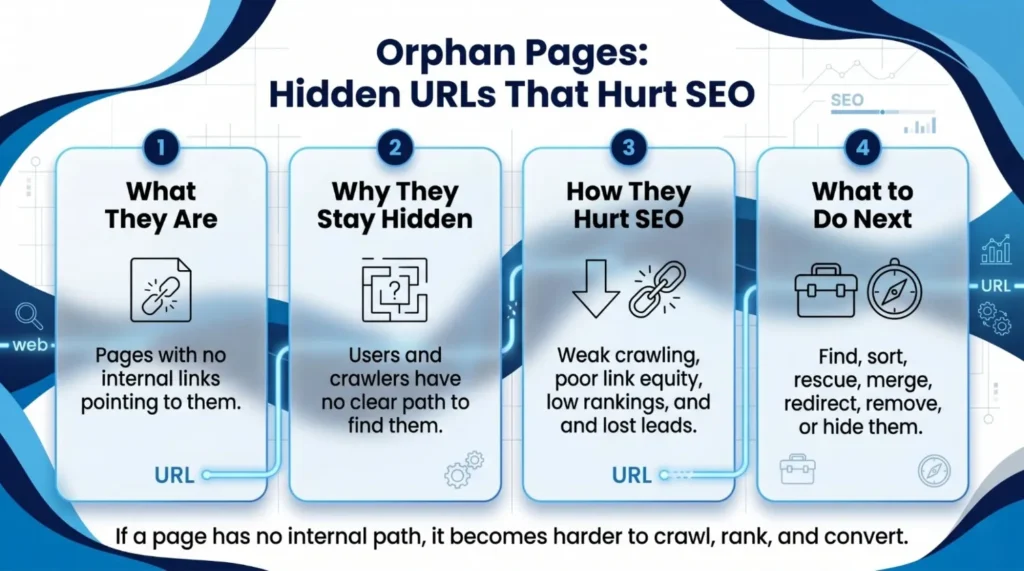
What Orphan Pages Mean for SEO and Discovery in 2026
An orphan page is a page with no inbound links from within the same website. It might still have external backlinks or appear in a sitemap, but it is not connected to your site’s link structure. This disconnection makes the page a dead end for both visitors and search engines.
It is important to distinguish orphan pages from pages without backlinks. A page can have inbound links from other websites, yet still be orphaned if no internal page points to it. Search engines rely on internal links to discover and understand relationships between pages. When a page has no incoming internal links, it lacks context and importance signals.
Some people also use terms like unlinked pages, standalone pages, orphan content, hidden pages or disconnected URLs. Regardless of the name, the defining feature is the same: there is no clear path from other pages on the site. According to Google’s guidance, every page you care about should have a link from at least one other page on your site. Without those links, search engines and users may never reach the page.
Why Unlinked Pages Hurt Crawling, Rankings and Leads
Why are orphan pages bad for SEO? There are several reasons:
- Delayed discovery. Search engines use internal links to crawl websites efficiently. When pages have no incoming links, crawlers may find them late or not at all. Google notes that internal links help both people and search engines find other pages on your site.
- Poor link equity flow. Internal links distribute authority (often called link juice) from one page to another. Orphan pages receive little or no link equity, so they rarely rank well.
- Weak user experience. Users navigate websites through menus and in‑content links. Orphan pages are isolated; visitors must know the direct URL to reach them. Important pages may remain invisible, leading to missed conversions and lost trust.
- Reduced topic authority. Modern SEO often relies on topic clusters. Isolated pages break the connections between related content, weakening your topical relevance and lowering the chances of ranking for competitive terms.
- Wasted crawl budget. Search engines allocate a limited crawl budget to each site. When crawlers spend time on low‑value orphan pages, they may miss more important content. In one large site analyzed by Botify, more than 70 % of the pages crawled by Google were orphan pages. The company found about 800 000 orphan pages compared to 300 000 pages in the site structure, demonstrating how hidden URLs can bloat indexation.
The main message is simple: orphan pages can turn useful content into hidden content. They underperform because search engines cannot see their connections and users cannot find them.
How Isolated Pages Create Gaps in Your Site Structure
Most orphan pages are not created on purpose. They appear naturally over time as websites evolve. Common causes include:
- Website redesigns or migrations. When you change site architecture, some old pages may be left without links. A page that was accessible from a menu in the old design might become invisible in the new one.
- Deleted menu links or categories. Removing a navigation item can break the path to deeper pages, turning them into orphans.
- Old landing pages and expired campaigns. Seasonal offers or campaign-specific pages often get forgotten once they end. Without a linking plan, they remain live but isolated.
- Content clean-ups. Deleting or merging categories, tags or blog series can leave individual posts without inbound links.
- CMS changes and poor linking habits. Publishing workflows may not enforce internal linking. Busy teams might publish pages without thinking about how they fit into the larger website.
- Technical errors. Broken navigation, incorrect canonical tags or problematic sitemap generation can create unwanted orphan URLs.
Because these gaps develop quietly, a website can accumulate thousands of orphan pages over the years. A graph theory‑based case study on a travel website found that about 50 % of their pages were orphan pages before optimization. Such gaps not only waste crawl budget but also hide valuable content.
Find Orphan Content Using Crawls, Sitemaps and Data Sources
Finding orphan pages is detective work. You need to compare different lists of URLs to identify pages that exist but are not linked internally. Here is a step‑by‑step process:
- Crawl your website. Use a site crawler (such as Screaming Frog or an SEO spider) to list all URLs reachable through internal links. This is your linked URL list.
- Export your XML sitemap. Sitemaps contain all the URLs you want search engines to discover. Export this list to compare against your crawl data.
- Check Google Search Console (GSC). In GSC, review the Pages report to see URLs that Google has indexed or attempted to index. Export these URLs.
- Review analytics landing pages. Look at your analytics (e.g., GA4) to find pages that have received visits. These pages might be indexed even if they are not linked.
- Check backlinks. Use a backlink tool (such as Ahrefs or Majestic) to find pages with external backlinks. A page may be orphaned internally but still have inbound external links.
- Analyze server log data. For large sites, server logs show which URLs search engines actually crawl. This can reveal orphan pages that get bot visits.
After gathering these lists, compare them. Pages that appear in sitemaps, GSC, analytics or logs but are missing from your internal crawl are likely orphan pages. Botify’s case study, for example, found about 800 000 orphan pages by comparing server logs with site crawl data.
Sort Disconnected URLs Before Choosing the Right Fix
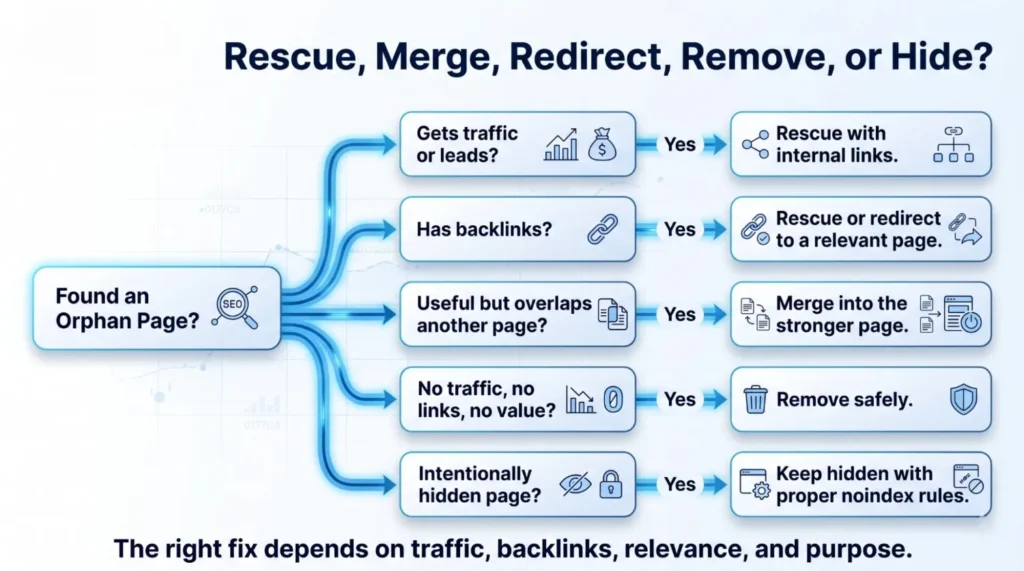
Not every orphan page deserves the same treatment. Before you start adding links, evaluate each page’s value. Ask yourself:
- Does the page get traffic? Check analytics to see if it receives visits or conversions.
- Does it have backlinks? External links can make a page valuable despite being orphaned internally.
- Does it support a service or product? Pages that answer buyer questions or describe services should usually be rescued.
- Is it outdated or duplicated? Old, thin or duplicate content may not be worth saving.
- Does it belong in a topic cluster? If it complements other pages, linking it could strengthen topical authority.
- Is it intentionally hidden? Some pages (thank‑you pages, paid‑ad landing pages, private downloads) are designed to be hidden. These should remain unlinked but managed properly.
Sorting pages helps you choose the right action for each URL. You avoid wasting time fixing pages that should instead be removed or redirected.
Rescue Valuable Pages with Relevant Internal Links
Useful orphan pages should be connected to your site in a meaningful way. A rescued page should be easy for search engines to crawl and for users to reach. Here are the best practices:
- Link from related service pages or blogs. Find existing pages that share a topic with the orphan page and create contextual links. Use natural language so users understand why the link is there.
- Use descriptive anchor text. Avoid generic phrases like “click here.” Instead, use anchor text that clearly describes what the linked page is about. This helps both readers and search engines.
- Add context around the link. Provide a brief explanation of why the page is useful. This improves user experience and encourages clicks.
- Connect to a topic cluster. Place the rescued page within a hub or category page. Link it alongside other related resources so that it becomes part of a network.
- Ensure there is a clear next step. Within the rescued page, add links to deeper content or conversion pages. The goal is to create a natural journey for users and search engines.
A case study by LinkVector showed that adding internal links to previously orphan pages had a dramatic impact: 83 % of the pages involved increased in ranking, and six articles reached the #1 position on Google. This demonstrates the power of relevant internal links.
Consider reading SEO audit insights to understand how a thorough audit identifies linking opportunities and internal link-building tactics to plan effective connections.
Merge, Redirect or Remove Pages with Weak Value
Not every orphan page should be saved. Depending on its content and relevance, choose one of the following actions:
- Merge. If the orphan page contains useful information that overlaps with a stronger page, combine the content. Add 301 redirects from the old URL to the new consolidated page.
- Redirect. If the page is outdated but has some value (traffic or backlinks), redirect it to the most relevant page. This preserves link equity and user trust.
- Remove. If the page has no traffic, no backlinks and no future value, it may be best to delete it. Return a 404 or 410 status code so search engines know it is gone.
Merging or redirecting helps focus your site’s authority on a smaller set of high‑value pages. A large ecommerce site studied by Botify discovered that 70 % of its orphan pages were low‑value expired pages. Removing or redirecting these freed crawl budget for important content.
Keep Hidden Pages Safe with the Right Indexing Rules
Some pages are meant to be hidden from search results. Examples include thank‑you pages after a form submission, paid advertisement landing pages, limited‑time downloads, private event pages and email‑exclusive sign‑up pages. These pages should remain unlinked to protect user paths and conversion funnels. However, you must manage them properly:
- Add noindex tags. Prevent search engines from indexing pages that should stay hidden. Use the robots meta tag or X‑Robots‑Tag.
- Disallow in robots.txt. For non‑public pages, block crawling entirely.
- Remove expired campaigns. When a campaign ends, either delete or redirect the page. Do not leave outdated promotional pages live.
- Update sitemaps and internal links. Ensure hidden pages are excluded from sitemaps and navigation menus.
Hidden pages can be part of a healthy marketing strategy, but they must never be unmanaged. Regularly review these pages to avoid confusion and accidental indexing.
Build Crawl, User and Buyer Paths for Every Key Webpage
An effective fix is not just about adding a link; it is about creating paths for search engines, users and buyers. For each important page, you need:
- A crawl path. At least one link from another page ensures that search engine bots can discover the page. More links from relevant pages improve authority.
- A user path. Visitors should be able to reach the page naturally from menus or contextual links. Consider where a user would expect to find the information and link accordingly.
- A buyer path. Once a visitor lands on the page, there should be a clear next step (e.g., contact form, product page, related article). This guides potential customers through the buyer journey.
When all three paths are in place, the page is fully integrated into your site. The case study by Botpresso shows that after reducing orphan pages from 50 % to 1 % using a graph‑theory internal linking solution, the website saw a gradual increase in rankings and impressions. This improvement came from making pages accessible through multiple paths.
Prevent New Orphan Pages with a Simple Publishing Plan
Prevention is easier than cure. To avoid creating orphan pages in the future, follow these guidelines:
- Plan internal links before publishing. When creating a new page, decide where it fits within your site structure. Identify at least one parent page that will link to it.
- Add new pages to relevant hubs or categories. Include them in menus or category pages where appropriate.
- Link new blogs to related services. A blog post should point readers to service pages or other resources that expand on the topic.
- Update older content. After publishing a new page, go back to older articles and add links where relevant. This strengthens your topic clusters.
- Review links after redesigns or migrations. Check that all important pages remain linked in the new structure. Fix broken menu items quickly.
- Align sitemaps and internal links. Make sure that every URL in your sitemap is reachable through at least one internal link.
- Build topic clusters around core services. Organize your content so that related pages link to each other and to a main hub.
The best orphan page fix is prevention. A simple internal linking checklist can ensure every new page has a home.
Run a Monthly Audit Checklist for Orphan Pages and SEO Fixes
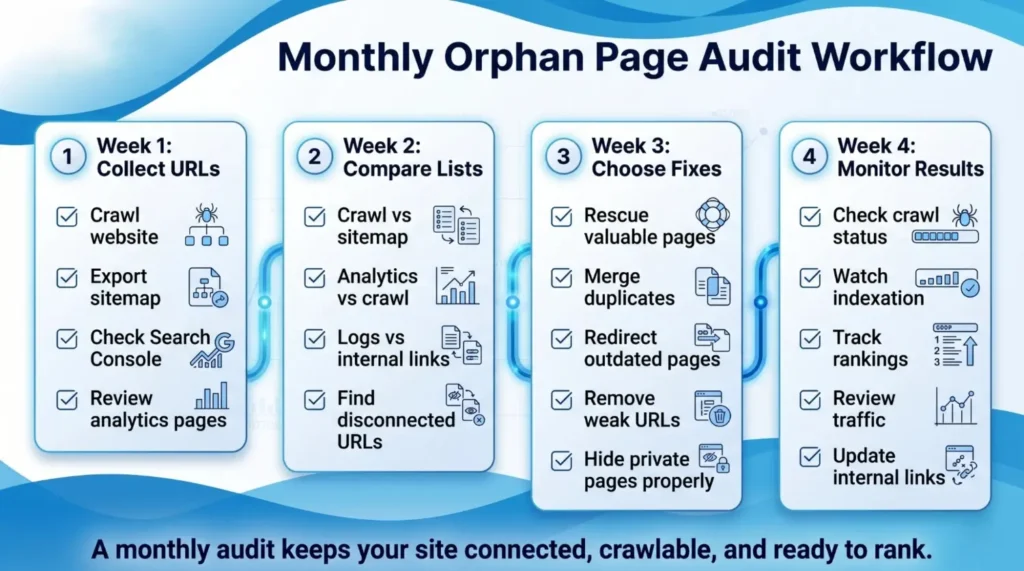
Keeping your website clean and connected requires regular audits. Here is a monthly checklist:
- Week 1: Collect URLs. Crawl the website, export sitemap URLs, check Search Console for indexed pages and review analytics landing pages.
- Week 2: Compare URL lists. Identify pages missing from the internal crawl but present in sitemaps, analytics or logs. Check the traffic, backlinks and index status of these pages.
- Week 3: Choose the fix. For each orphan page, decide whether to rescue with internal links, merge with another page, redirect to a relevant URL, remove entirely or keep hidden with noindex.
- Week 4: Monitor results. After implementing fixes, monitor crawl status, indexation changes, traffic and rankings. Update internal links if necessary.
A monthly audit ensures that orphan pages do not accumulate and that your website remains easy to navigate for both users and search engines.
Conclusion – Turn Hidden Content into Assets
Orphan pages are hidden treasures or hidden waste. They can be valuable pieces of content that are simply disconnected, or they can be outdated pages that harm your site’s efficiency. By understanding what orphan pages are, why they matter and how to find them, you can make informed decisions about each page.
Use crawls, sitemaps, analytics and log files to locate them. Sort each page by value. Rescue valuable pages with relevant internal links, merge or redirect overlapping content, remove pages with no value and manage intentionally hidden pages properly. Prevent future orphan pages by planning internal links before publishing and running monthly audits.
Fixing orphan pages not only improves your site’s SEO but also enhances user experience and conversion paths. After all, a well‑connected website is like a well‑organised library: every book has a place, and every reader can find what they need. If you need professional help identifying and fixing orphan pages, WR SEO Specialist offers tailored technical SEO audits and internal linking strategies to turn hidden pages into high‑performing assets.
FAQs
What are orphan pages in SEO?
Orphan pages are web pages on your website that have no internal links pointing to them. They exist but are disconnected from the site’s navigation or content structure. Because of this isolation, search engines and users may not find them easily.
What are orphan pages on a website?
They are the same thing: pages without inbound internal links. These might still be in your sitemap or have external backlinks, but nothing within your site links to them.
Are orphan pages bad for SEO?
Generally, yes. Orphan pages receive little or no link equity and may be discovered late by search engines. They can waste crawl budget and hide important content. In one case study, over 70 % of pages on a site were orphan pages, showing how much potential traffic can be lost. However, some orphan pages, like thank‑you pages or private downloads, are intentional and should remain hidden but properly managed.
How do I find orphan pages?
Compare different URL sources: crawl your site to find linked pages, export your XML sitemap, check Google Search Console, review analytics for landing pages and examine server logs. Pages that appear in sitemaps or analytics but not in your crawl are likely orphan pages.
Can Google index orphan pages?
Yes. Search engines can sometimes index orphan pages if they are in your sitemap or have external backlinks. However, they may not rank well because they lack internal link context. Google recommends that every important page have at least one internal link.
Do sitemap URLs count as internal links?
No. A sitemap helps search engines discover URLs, but it does not pass link equity. Internal links within content or navigation are necessary to build authority.
Should I delete or redirect orphan pages?
It depends. If the page is valuable, rescue it by adding internal links. If it overlaps with another page, merge and redirect it. If it is outdated and has no value, remove it. Always evaluate the page’s traffic, backlinks and relevance before deciding.